Tour
Every place in Endless in sidebar order, from chat and assets to settings, with what each is for and why one might be missing.
Every place in the app, in sidebar order, then Settings. The last section explains why you may not see every row.
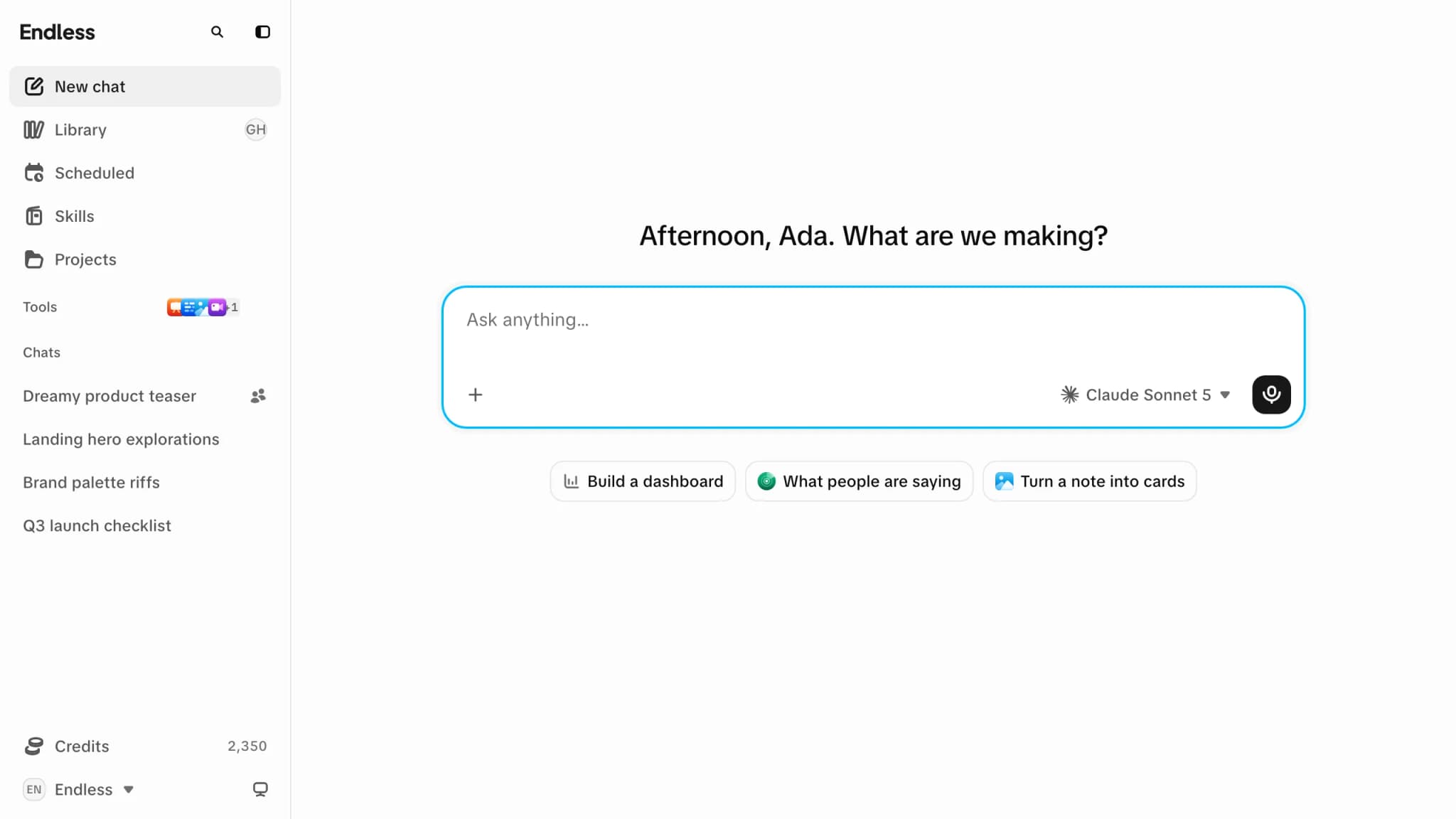
Sidebar
| Row | What it is for |
|---|---|
| Search | Opens the command palette to jump to any page, project or setting. |
| New chat | The home chat: writes, generates, searches the web and reads social platforms. If chat is off, home opens the Library. |
| Library | Everything you made or uploaded, with filters. |
| Scheduled | Prompts that run on a schedule, each with a page of runs. |
| Skills | Your workflows, the built-in ones, and their switches. |
| Projects | One per client or campaign; attach one to a chat for context. |
| Chats | Your latest chats. View all opens the history. |
| Footer | Your credit balance, the workspace switcher (one workspace per tab) and the theme switch. |
Tools
Each tool is turned on per workspace. Manage tools on the Tools heading reorders or hides tools in your own sidebar only.
| Tool | What it does |
|---|---|
| Canvas | A board shared live with everyone who opens it. |
| Transcripts | Turns a recording or link into searchable text with speakers and timestamps. |
| Image | Prompt, model, parameters and credit cost, then generate. |
| Video | The same for clips, from text, a still or a clip. Cutting a moment from a recording happens in chat. |
| Social radar | Searches recent posts on the web, X and Reddit and delivers the results to a chat. |
The member directory has no sidebar row: open it by selecting someone in a chat mention or in Settings → Members.
Settings
Everyone sees Account and Workspace. Editing workspace pages needs permission to manage the workspace, its members or its roles, and Billing is for admins and billing managers only. Governance needs permission to read governance (admins have it); for anyone else it is hidden and an old link opens Settings → Account. See roles and permissions.
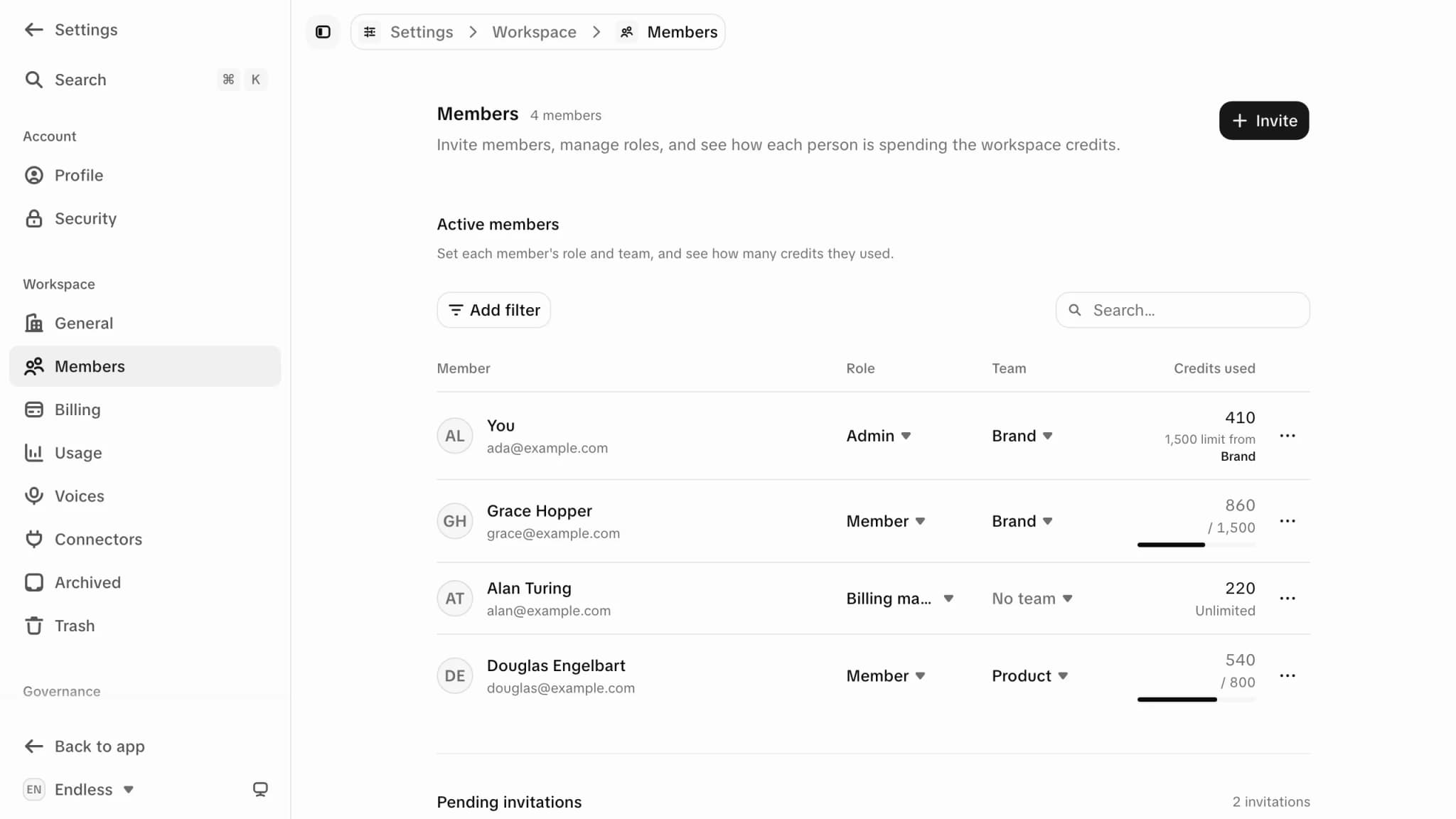
| Section | Pages |
|---|---|
| Account | Profile, Security |
| Workspace | General, Members, Billing, Usage (without governance permission it shows only your own usage), Voices, Connectors, Archived, Trash |
| Governance | Teams (needs permission to manage the workspace), Activity, Spending (whether chat asks before spending, and above what cost; not in every workspace yet), Models, Skills, Tools, Roles (needs permission to manage roles, where custom roles are on) |
If something is missing or won't run
| Cause | What you see |
|---|---|
| The feature is off | The row is gone and a saved link opens home. Set in Settings → Governance → Tools for the workspace, a team or you, within your plan. Turning chat off also turns off scheduled tasks. This is the only cause that removes a row. |
| Your role doesn't allow it | Settings pages are hidden; tools stay visible. A Viewer sees Image but is refused on send, because they can't create content. |
| A spending limit is used up | Nothing changes until you send. A personal or team limit can run out while the workspace still has credits. See credits and spending. |